Why does nobody talk about the fact that when your kid starts school, you are constantly trying to find dates buried in PDFs and emails? Dua had just started Reception and suddenly I was meant to hold photo days, welcome meetings, forms and everything she needed to take in, while still doing the rest of life. I would read an email, think I had remembered it, then realise the date had disappeared from my head. There was always another attachment.
So I literally created an AI agent to do it. At 7pm every evening it scans the last three days of school and household email, opens the attachments, pulls out the dates and puts them in my diary. It invites my husband to the calendar event, and if there is something we actually need to do, like getting Dua's uniform ready for school photos, it puts the task into Todoist with the real deadline.
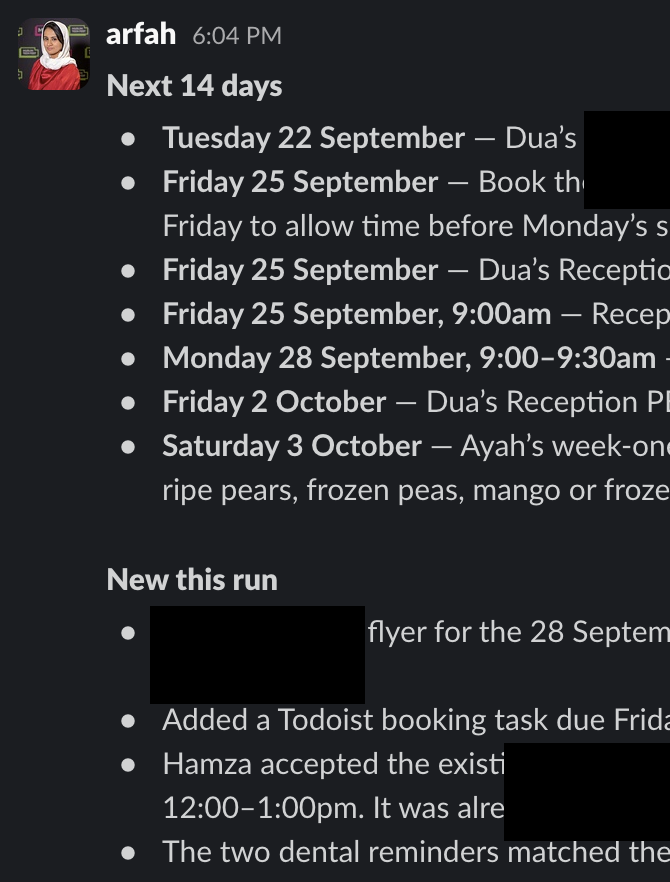
For anyone new to agents, this is just a set of instructions I wrote once and scheduled to run for me. It knows Dua is in Reception, knows which emails to look at and knows where each kind of information belongs. A date goes into the calendar. A job goes into the to-do list. Then it sends us one shared message with what is coming in the next two weeks, which means we can actually stay on top of the mental load without both of us reading the same email and hoping one of us remembers it.


The important bit is that I did not ask it to summarise my inbox. A summary still leaves me holding the date and deciding what to do with it. This routine reads the PDF, checks whether the event or task already exists, then puts the useful detail into the system my husband and I already share. The email stops being the destination. It becomes the source.
My real learnings
Attachments are the work. If the agent reads the email but skips the letter attached to it, the routine is pretending. Deduplication matters just as much, because a three-day search window protects you when one run fails, but without a search-before-create rule it also gives you the same non-uniform day three times. And the most useful guardrail is simple: it never guesses a date. If a letter says “next Friday” and the year is not clear, it quotes the exact wording back to me and waits. A confidently wrong school date is worse than one I still need to confirm.
The easy way to build your own
You need an AI tool that can run a scheduled task and access your email, calendar and task app. Connect those first, then give the routine a narrow job. Mine does not reply to school, make payments or confirm anything. It reads, files and flags.
Step 1
Choose the mail it is allowed to touch
Start with the school sender domain, your co-parent’s email if household plans arrive there, and a few subject words such as your child’s first name or “nursery”. A tight search is safer and far more useful than asking an agent to roam your whole inbox looking for anything vaguely family-shaped.
Step 2
Paste this routine into a scheduled task
Replace the brackets with your own sources and calendar details. Schedule it for a time when you can glance at the report, rather than during the morning rush.
Run every day at [7pm] in [your timezone].

Search the last 3 days of email from [school domain], from [co-parent email], and messages matching [child's first name OR nursery OR school keyword]. Merge duplicates by thread.

Open every attachment. Extract dated events, deadlines, forms, payments, sign-ups, and anything the child needs to bring or do.

Never guess a date. If wording such as “next Friday” is ambiguous, quote it under “Needs me to confirm” and create nothing.

Before creating anything, search for a similar calendar event within one day either side and search the task app by email thread ID and subject.

Create calendar events for dated items. Add [co-parent email] as a guest. Use all-day events for school days with no stated time.

Create tasks only when a parent must act. Use the real deadline as the due date and include the source email thread ID.

Report in this order:
1. Next 14 days, earliest first, including anything needed.
2. New today, including what you created or found already filed.
3. Needs me to confirm.
4. Anything that failed.

Do not reply, pay, book, submit or confirm anything.
If you'd rather build this alongside me, that's what AI Made Doable is for.
Step 3
Test it on three awkward emails
Give it one email with a PDF, one duplicate reminder and one date written badly. Check the calendar date, the task deadline, the guest and the source thread before you let it run unattended. The boring edge cases are the actual test, because a clean email was never the problem.
Things to look out for
Keep replies, payments and bookings outside the routine, especially when children are involved. Check whether all-day calendar events land on the right date in your timezone, because some systems treat the end date as exclusive. Keep the search window overlapping and let deduplication handle repeats, so one missed run does not create a gap. Start by running it against old emails, then switch on the schedule once you trust where it puts things. The goal is a quieter morning, not a cleverer inbox.
AI Made Doable
This is exactly the kind of thing we build together
If this is the first time AI's actually done something useful for you, that's the whole point. AI Made Doable is a live weekend cohort, two Sunday mornings in November, where you stop talking to AI and start actually working with it. Real systems, not more tips you'll never use. Sales open on 3 November and the group is capped, so join the waitlist to hear first.
Join the waitlist →